
Indoor Module Management:
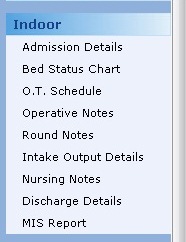
To use this module and its features, please follow the steps below:
|
Admission Details |
Shows the admission list of the patient admitted in various hospitals. From here you can Add new admission, Edit or Delete Admission from the screen. |
|
Bed status Chart |
Shows the ward or bed status at the clinic. It shows the location of the bed. |
|
OT Schedule |
It shows the schedule of operations in operation theaters |
|
Operative Notes |
It shows the list of patients who are operated, operation date & operation type. From here you can Add newly operated patient, Edit or delete. |
|
Round Notes |
It shows patient name who are admitted, doctor name & admission date. |
|
Intake Output Details |
This shows the detailed list of patients and their Intake Output details by applying the filters into the search bar. |
|
Nursing Notes |
It shows the details of medicines given to patients and its timings. |
|
Monitoring of Infections |
It shows the details of infections, its type, procedure and list of Antibiotics. |
|
Discharge Details |
Shows the discharge list of the patient from the hospital. From here you can Add, Edit or delete discharge details of the patient. |
|
MIS Reports |
To View all records of patients from OPD, Indoor, and MLC. |
Comments
0 comments
Please sign in to leave a comment.